Quick Download Links







For original install CD ISO, check out BadBoyforum at Filefront

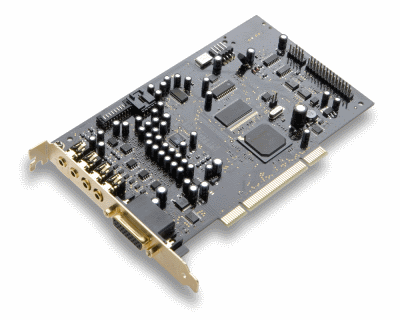
This download is a driver providing Microsoft® Windows® 7 support for Creative Sound Blaster® X-Fi™ series of audio devices. For more details, read the rest of this web release note.
Take note of the following:
- This download currently supports Windows 7 only. Support for Windows Vista and Windows XP will be available at a later date.
This download supports the following audio devices only:
- Sound Blaster X-Fi XtremeGamer Fatal1ty® Professional Series
- Sound Blaster X-Fi Platinum Fatal1ty Champion Series
- Sound Blaster X-Fi XtremeMusic
- Sound Blaster X-Fi XtremeGamer
- Sound Blaster X-Fi Platinum
- Sound Blaster X-Fi Fatal1ty
- Sound Blaster X-Fi Elite Pro
- Sound Blaster X-Fi
Fixes:
Resolves the following issues:
- System taking more than two minutes to shut down.
- PowerDVD® DX 8.3 (Dell® version) not working properly.
- Passthrough of Dolby®/DTS® audio to an external decoder not working with Windows Media Player 12.
Requirements:
- Microsoft Windows 7 64-bit or Windows 7 32-bit
- Sound Blaster X-Fi audio devices listed above
Notes:
- Do not install this driver for Sound Blaster X-Fi Xtreme Audio.
- To install this driver
- Download the SBXF_PCDRV_LB_2_18_0015.exe file onto your local hard disk.
- Double-click the downloaded file.
- Follow the instructions on the screen.
daniel_k’s SB X-Fi Series Support Pack 2.0 (Dated 05/15/2009)
This software/driver pack is unofficial, not supported by Creative Labs and is provided as is, without any warranties.
Supports the following X-Fi models (for Xtreme Audio, click here):
- Creative SB X-Fi PCI (OEM/Retail Elite Pro, Fatal1ty, Platinum, Platinum Fatal1ty Champion, XtremeGamer, XtremeGamer Fatal1ty Pro, XtremeMusic)
- Creative SB X-Fi OEM SB077x PCI (Hendrix models for Dell, HP, Gateway, Lenovo, Fujitsu-Siemens, Alienware and others)
- Creative SB X-Fi Titanium PCI-E (all Retail/OEM models)
- Auzentech X-Fi Prelude 7.1
Operating Systems supported (32-bit and 64-bit editions):
- Windows XP
- Windows Server 2003
- Windows Vista
- Windows Server 2008
- Windows 7
Items that will be installed, depending on the detected card:
- Creative SB X-Fi series driver 2.18.0013.1
- Creative SB X-Fi OEM SB077x series driver 2.18.0014.1
- Creative SB X-Fi Titanium series driver 2.17.0007.10
- Auzentech X-Fi Prelude driver 2.14.0001 v1.1
- Auzentech X-Fi Forte driver 2.20.0000.0 v1.0
- ALchemy 1.25.10
- Audio Control Panel 2.56.06
- AutoMode Switcher 1.01.01
- Console Launcher 2.62.00
- DDL and DTS Connect License Activation 2.00.03 (*)
- Dolby Digital Live Pack 3.00.01 (*)
- DTS Connect Pack 1.03.02 (*)
- SoundFont Bank Manager 3.21.00
- THX Console 3.10.23
- Volume Panel 2.21.10
(*) – purchase and activation required, except SB X-Fi Titanium, Auzentech X-Fi Prelude and Auzentech X-Fi Forte.
Windows Security warning during driver installation
When prompted with:
“Windows can’t verify the publisher of this driver software” choose “Install this driver software anyway”.
List of Improvements and fixes
– CMSS works properly on Windows 7 (Auzentech X-Fi Prelude).
– THX Console works with Auzentech X-Fi Prelude, Auzentech X-Fi Forte and other cards.
– All setup scripts were modified to detect Windows 7.
– Audio Console, Console Launcher and Volume Panel now load faster.
– Updated many applications and shared components.
Windows MIDI Device Configuration Utility
Use this utility to change the MIDI playback device for 32-bit and 64-bit applications, including Windows Media Player.
Download:
Filename: XFI_SupportPack_2_0.exe
File size: 91.0 MB
CRC32 hash: 566C5E56
SHA-1 hash: BA4B85CDD1F36F992FB281D81205EEFCF0F9DBC0
To verify the file hashes, I recommend HashTab.
Mirrors: RapidShare
All files are property of Creative Technology Ltd., unless otherwise noted.
Be sure to visit daniel_k’s blog: http://danielkawakami.blogspot.com/
Product Identification Module Update
This update resolves the hardware/device detection issue for Creative Sound Blaster® X-Fi™ and X-Fi Titanium series of audio devices in Microsoft® Windows® 7. For more details, read the rest of this web release note.
This download supports the following audio devices only:
- Sound Blaster X-Fi Titanium Fatal1ty® Champion Series
- Sound Blaster X-Fi Titanium Fatal1ty Professional Series
- Sound Blaster X-Fi Titanium Professional Audio
- Sound Blaster X-Fi Titanium
- Sound Blaster X-Fi XtremeGamer Fatal1ty Professional Series
- Sound Blaster X-Fi Platinum Fatal1ty Champion Series
- Sound Blaster X-Fi XtremeMusic
- Sound Blaster X-Fi XtremeGamer
- Sound Blaster X-Fi Platinum
- Sound Blaster X-Fi Fatal1ty
- Sound Blaster X-Fi Elite Pro
- Sound Blaster X-Fi
Fixes:
- Resolves the hardware/device detection issue in Creative Software AutoUpdate running on Windows 7.
Requirements:
- Microsoft Windows 7 64-bit, Windows 7 32-bit
- Sound Blaster X-Fi and X-Fi Titanium series of audio devices listed above
Notes:
- To install this driver
- Download the file onto your local hard disk.
- Double-click the downloaded file.
- Follow the instructions on the screen.
Windows XP \ Vista\ Windows 7 \ 32bit \ 64bit Driver

This download is a driver providing Microsoft® Windows® 7, Windows Vista® and Windows XP support for Creative Sound Blaster® X-Fi™ series of audio devices. For more details, read the rest of this web release note.
This download supports the following audio devices only:
- Sound Blaster X-Fi XtremeGamer Fatal1ty® Professional Series
- Sound Blaster X-Fi Platinum Fatal1ty Champion Series
- Sound Blaster X-Fi XtremeMusic
- Sound Blaster X-Fi XtremeGamer
- Sound Blaster X-Fi Platinum
- Sound Blaster X-Fi Fatal1ty
- Sound Blaster X-Fi Elite Pro
- Sound Blaster X-Fi
Added Features or Enhancements:
For systems using Windows 7 or Windows Vista
- What U Hear feature is enabled.
To find out the Product ID of your audio device and if it supports the following feature in Windows XP, click here.
- Dolby® Digital and DTS® decode re-established for sound cards that included decoding in their Windows XP drivers (Not applicable for products that included a 3rd party software DVD player license in the package).
Requirements:
- Microsoft Windows 7 64-bit, Windows 7 32-bit, Windows Vista 64-bit with Service Pack 1 (SP1), Windows Vista 32-bit with SP1, Windows XP Professional x64 Edition, Windows XP Service Pack 2 (SP2), Windows XP Media Center Edition (MCE) 2005 or Windows XP MCE 2004
- Sound Blaster X-Fi audio devices listed above
Notes:
- Do not install this driver for Sound Blaster X-Fi Xtreme Audio.
- To install this driver
- Download the SBXF_PCDRV_LB_2_18_0013.exe file onto your local hard disk.
- Double-click the downloaded file.
- Follow the instructions on the screen.
Open Source Linux Driver
Filesize : 68.8 KB Download
This download is a source release driver providing Linux® 32-bit / 64-bit OS support for Creative Sound Blaster® X-Fi™ and X-Fi Titanium series of audio devices. For more details, read the rest of this web release note.
Take note of the following:
- THIS IS AN UNSUPPORTED DRIVER. There is no technical support for this driver.
- We recommend that only experienced users install this driver. Do not install this driver on a system used to perform critical tasks.
This download is intended for the following audio devices only:
- Creative Sound Blaster X-Fi Titanium Fatal1ty® Champion Series
- Creative Sound Blaster X-Fi Titanium Fatal1ty Professional Series
- Creative Sound Blaster X-Fi Titanium Professional Audio
- Creative Sound Blaster X-Fi Titanium
- Creative Sound Blaster X-Fi Elite Pro
- Creative Sound Blaster X-Fi Platinum
- Creative Sound Blaster X-Fi Fatal1ty
- Creative Sound Blaster X-Fi XtremeGamer
- Creative Sound Blaster X-Fi XtremeMusic
Current release features:
- ALSA PCM Playback
- ALSA Record
- ALSA Mixer
Known issues:
- External I/O modules are not supported in this driver release.
- Applications from the Installation CD of your Sound Blaster audio device will not work with this driver.
Requirements:
- Linux x86 / x86_64 OS
- Creative Sound Blaster audio devices listed above
Notes:
- To install the driver, do the following:
- Download the tarball package onto your local hard disk.
- Un-tarball the downloaded package to unpack its contents.
- Read the README file and follow the instructions.
EAX Software Application
This download is an application for use with Creative audio products. It restores 3D audio and EAX® effects for certain DirectSound®3D games in Microsoft® Windows® 7 and Windows Vista®. For more details, read the rest of this web release note.
This download supports the following audio products only:
- Creative Sound Blaster® World of Warcraft® Headset Series
- Creative Sound Blaster Wireless for iTunes®
- Creative Sound Blaster X-Fi™ Titanium Fatal1ty® Champion Series
- Creative Sound Blaster X-Fi Titanium Fatal1ty Professional Series
- Creative Sound Blaster X-Fi Titanium Series
- Creative Sound Blaster X-Fi Elite Pro
- Creative Sound Blaster X-Fi Fatal1ty
- Creative Sound Blaster X-Fi Platinum Fatal1ty Champion Series
- Creative Sound Blaster X-Fi Platinum
- Creative Sound Blaster X-Fi XtremeGamer Fatal1ty Pro
- Creative Sound Blaster X-Fi XtremeGamer
- Creative Sound Blaster X-Fi XtremeMusic
- Creative Sound Blaster X-Fi Xtreme Audio
- Creative Sound Blaster X-Fi Xtreme Audio Karaoke
- Creative Sound Blaster X-Fi Xtreme Audio Notebook
- Creative Sound Blaster X-Fi Notebook
- Creative Sound Blaster X-Fi Surround 5.1
- Creative Sound Blaster X-Fi Go!
- Creative Sound Blaster X-Fi Play!
- Creative Sound Blaster Arena Surround
- Creative Sound Blaster Audigy® 4
- Creative Sound Blaster Audigy 2 ZS Platinum Pro
- Creative Sound Blaster Audigy 2 ZS Platinum
- Creative Sound Blaster Audigy 2 ZS Notebook
- Creative Sound Blaster Audigy 2 ZS
- Creative Sound Blaster Audigy 2 ZS Video Editor
- Creative Sound Blaster Audigy 2 ZS SE
- Creative Sound Blaster Audigy 2 Platinum EX
- Creative Sound Blaster Audigy 2 Platinum
- Creative Sound Blaster Audigy 2
- Creative USB Sound Blaster Audigy 2 NX
- Creative Sound Blaster Audigy 2 Value
- Creative Sound Blaster Audigy Platinum EX
- Creative Sound Blaster Audigy Platinum
- Creative Sound Blaster Audigy
- Creative Sound Blaster Audigy LS
- Creative HS-1200 Headset
- Creative USB Gaming Headset
- Creative USB Speaker
Fixes:
- Enables the DirectSound3D game audio to be processed by your Sound Blaster audio device to deliver EAX effects, 3D audio spatialization, sample rate conversion and hardware audio mixing. Without this, most DirectSound3D games will be reduced to stereo output without any EAX effects.
- Improves 3D audio processing for host-based Sound Blaster audio devices.
Requirements:
- Microsoft Windows 7 64-bit, Windows 7 32-bit, Windows Vista 64-bit with Service Pack 2 (SP2) or Windows Vista 32-bit with SP2
- Creative audio product listed above
Notes:
- Do not install this application if you do not play DirectSound3D games in Windows 7 or Windows Vista.
- To find out more about Creative ALchemy or view the list of DirectSound3D games supported, click here.
- To install the application
- Download the ALMY_PCVTAPP_LB_1_41_02.exe file onto your local hard disk.
- Close all other Windows applications.
- Double-click the downloaded file.
- Follow the instructions on the screen.


 No More Goat Soup
Recent Spammers